


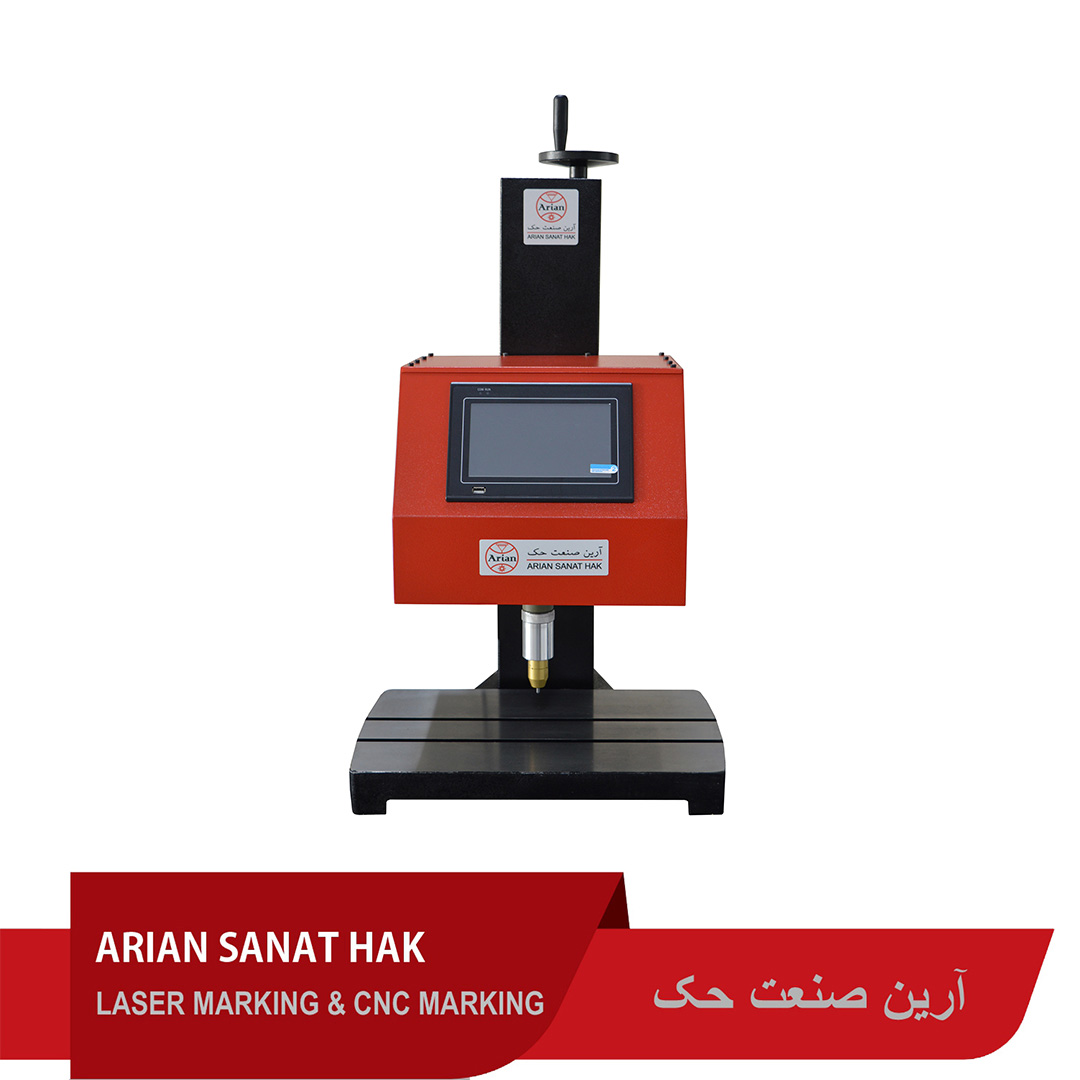

The HA160 impact engraving machine allows engraving on a variety of metals such as copper, brass, cast iron, aluminum, steel, and various types of steel.
Impact engraving machine model HA160
This impact engraving machine is suitable for engraving on automotive parts, product nameplates, industrial parts, etc.
Impact engraving machine has many different applications. Arian Sanat Hak Company offers various models of metal engraving machines to suit the needs of customers. The HA160 model metal engraving machine is used for engraving on light parts that can be easily moved. This machine is the most practical metal engraving machine in the automotive parts industry, product nameplates, industrial parts, etc.
The engraving depth in this model of the machine is greater than that of various types of laser marking machines. The impact engraving machine has the ability to engrave on all types of metals up to a hardness of 60 Ra, as well as plastics. For engraving with a depth of more than one mm, it is recommended to use the HA300 engraving machine with a maximum depth of 2 mm.
Function of metal engraving machine
The way the HA160 engraving machine works is that first the appropriate clamp or fixture is closed to hold the piece on the machine table. Then you engage the metal parts or place the appropriate fixture and issue the engraving command via the computer. In this case, the engraving tool engraves the desired design on the metal at high speed. The engraving depth can be adjusted from a very small value to a maximum of 1 mm.
Product operation video
Engraving tool
The engraving tool in this device is a type of air tool in sizes 2.5, 3 and 4 mm. This powerful and high-speed engraving tool can create 25 strokes per second on metal parts, and with this method, engraving operations can be easily created on all types of metal parts. The engraving depth can be adjusted by adjusting the air pressure of the device and the size of the tool.
Minimum air pressure 1 bar (for shallow engraving)
Maximum air pressure 4 bar (for deep engraving)
This device is also available in an electric tool model. It should be noted that the engraving depth and quality of engraving in an air tool are much greater than in an electric tool, so an electric tool is recommended only in special cases where it is not possible to use an air pump.
Important points when buying
- Device strength: The device’s strength is measured in Newtons (N) and indicates the device’s ability to penetrate various materials.
- Engraving speed: Engraving speed is measured in millimeters per second and indicates the speed at which the work is done.
- Worktable size: The size of the machine’s worktable should be proportional to the dimensions of the parts you plan to engrave.
- Control software: The device control software should be user-friendly and have a variety of features.

General tips for maintaining the engraving machine
- Suitable work environment:
- Clean and dry: Place the device in a clean and dry environment. Dust and moisture can damage the device’s internal components.
- Proper temperature: The operating temperature should be within the range recommended by the manufacturer. Extreme temperature fluctuations can damage the device.
- Fixed location: Try to place the device in a fixed location and avoid moving it frequently.
- Cleaning the device:
- Device body: Periodically clean the device body with a soft, damp cloth.
- Lubrication:
- Lubricate the moving parts of the machine periodically according to the manufacturer’s instructions.
- Check connections:
- Check the device’s connections and wiring periodically to ensure they are secure.
- Periodic service:
- Have the device serviced periodically by qualified technicians.
Special maintenance for impact engraving machines
- Changing needles:
- Replace the machine’s needles periodically. Dull or damaged needles can reduce the quality of the engraving
- Pressure adjustment:
- Adjust the air pressure of the device within the appropriate range. Improper adjustment can cause engraving errors.
- Use appropriate materials:
- Use the right materials for engraving.
- Turning off the device after use:
- Turning off the device after use:


Reviews
There are no reviews yet.